Their phones go in the locker. Their hours look after themselves.

ClockIn Dock turns your staff locker into the time clock. A phone on the dock is strong evidence someone is here — so the hours are honest, and the floor is phone-free while they work. Rotas, breaks, timesheets and payroll for hospitality. One venue or twenty.

Live in working venues since August 2026 — real rotas, real payroll, every week.

Docked · locker 04
21:14▮▮▮
Hi, SamSaturday 12 September
21:14:38
✓ Docked — clocked in
TAP TO CLOCK OUT
TIME ON SHIFT
3h 14m 38s
Clocked in · The Copper House 3:14
18:00shift ends 00:00

Two ways in. Both of them physical.

Every other rota app asks a phone to be honest about where it is. We put something on the wall instead — so clocking in is an action that happens in the venue, not a button pressed on a bus.

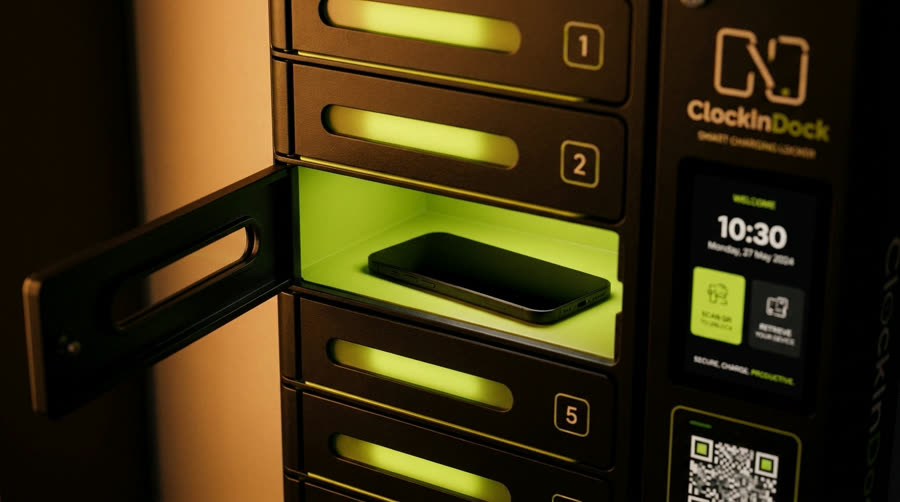
An open bay in the ClockIn Dock locker, lit lime, with a phone lying face up on the charging pad
The locker

The phone goes in the locker

The bay pops open, the phone goes face up on the pad, the shift starts. Lift it out at the end and the shift closes itself, hours already on the timesheet. Clocking in is putting the phone away — so it happens without anyone policing it: a docked phone at the venue is strong attendance evidence, not a cast-iron proof. No clocking in from the bus, no mate tapping you in, no "I definitely started at six".

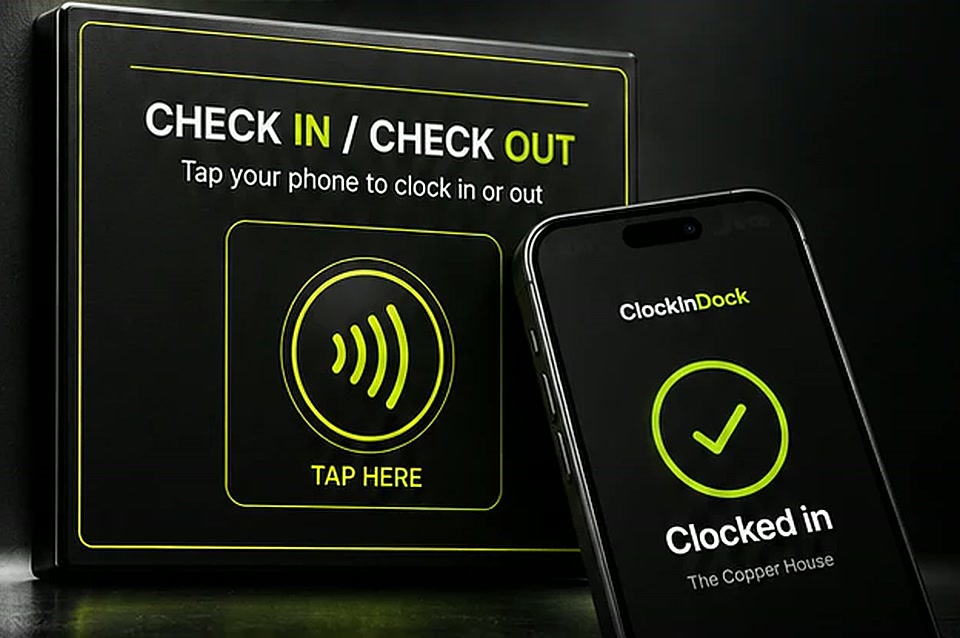
The ClockIn Dock wall plate: CHECK IN / CHECK OUT, tap your phone to clock in or out, with a contactless symbol and TAP HERE
The tap

Or tap the chip on the wall

One chip by the door, for a venue that doesn't want anything fitted. Staff tap it with the phone they already carry, the app opens and the shift starts. The venue is still checked, and the hours land in the same timesheet.

A rota builder that costs the week as you build it.

Build a week in the time it takes to make a coffee. Job roles down the side, days across the top. Drop shifts where you need cover and the wage bill adds up as you go — so you find out you've over-rostered Saturday while you can still do something about it, not when payroll runs.

Week of 7 September The Copper House ▾ Rostered cost £4,182.50
MON
TUE
WED
THU
FRI
SAT
SUN
Bar
18–01Tala
18–01Tala
17–00Yunis
17–02Tala
16–03Tala
16–00Tala
Floor
18–00Sharon
18–00Push
18–00Sharon
17–01Push
Call-outneeds 1
16–23Sharon
Kitchen
15–23Lully
15–23Lully
15–23Ali
15–23Lully
15–01Lully
14–01Ali
14–22Lully
Auto-fill the week Copy last week Check for clashes Publish to staff

It won't let you make the obvious mistakes

The builder knows who's on holiday, who's already working somewhere else that night, who's under-hours and who's heading for overtime. Try to double-book someone across two of your venues and it stops you before the rota goes out.

  • Auto-fill drafts the week from last week and your cover rules
  • Clash detection across every venue in the group
  • Holiday and unavailability already on the grid
  • Live cost as you build, before you commit

Bank holidays and clock changes, handled

The week view flags the things that quietly cost you money — a bank holiday you'd forgotten, or the night the clocks go back and a shift is genuinely an hour longer. Small print that only matters once or twice a year, which is exactly why everyone gets it wrong.

  • Bank holidays (England & Wales) marked on the builder
  • Daylight-saving nights flagged before you publish
  • Short-handed? Send a call-out — first to accept gets the shift

Publish the rota and it's already on their phone.

No printout by the pass. No photo of a printout in a WhatsApp group. No "I never saw that". The moment you publish, every member of staff has the week in their pocket — and if you move a shift at 11pm on a Thursday, their copy changes with it.

  • Push notification when the week goes live or a shift changes
  • Add the whole week to their phone calendar in one tap
  • Ask for a change, offer a shift to a teammate, or accept a call-out
  • Book holiday against a balance they can actually see
  • Set the days they can't work, so the builder stops asking
My timetable
7 – 13 September · 28 hours rostered
New rota published · 2 min ago
FRI 11 SEP
17:00 – 02:00
Bar · The Copper House
SAT 12 SEP
16:00 – 03:00
Bar · The Copper House
SHIFT MOVED +1h
SUN 13 SEP
16:00 – 00:00
Floor · The Anchor
MON 14 SEP
Day off
Requested · approved

Every venue you own, on one screen.

Run two sites or twenty. Staff can work across all of them, hours land against the venue they were actually worked at, and you see the whole group's wage bill as tonight happens — not on a spreadsheet next Tuesday.

The Copper House
Cardiff · Bar & kitchen
0ON SHIFT
£0COST TONIGHT
The Anchor
Penarth · Restaurant
0ON SHIFT
£0COST TONIGHT
Ruwa Locker
Cardiff Bay · Late night
0ON SHIFT
£0COST TONIGHT
GROUP · RIGHT NOW 21 people on shift across 3 venues £0

One person, several of your venues

Hospitality staff move between sites, and most systems make that a mess of duplicate accounts. Here it's one person with one login, rostered wherever you need them — and their hours always land against the venue where the shift was actually worked.

  • One account, many venues, no duplicates
  • Group-wide clash detection when you roster
  • Per-venue break rules, per-person pay rates

Managers see their venue. You see all of them.

A duty manager runs their own floor and approves their own team's requests. Owners get every venue at once, and an audit trail showing exactly who changed whose hours, and when.

  • Per-venue manager access, group-wide owner view
  • Every change to anyone's hours is recorded
  • Payroll per venue, or the whole group at once

The floor live tonight. Timesheets and payroll on Monday.

The floor, live

Who's in, who's late, who's still on their break, and what the shift is costing you right now — the kind of thing you currently work out by walking the room and doing sums in your head.

  • Lateness measured against the rota, not a guess
  • Force a clock-out when someone forgets
  • Call staff in when you're short — first to accept gets it
Currently on shift · The Copper House
NameSinceCostStatus
Priya R.18:00£46.20Live
Tomas N.18:00£44.80Live
Amara B.19:12£28.1072m late
Jonah C.17:45£51.00On break

Timesheets that are already right

Every hour arrives priced at the rate that applied that night, credited for the breaks your venue pays, and sorted into the correct week. Approve it and it's ready for payroll.

  • Payroll refuses to run on data it doesn't trust
  • Every edit to anyone's hours is recorded, with who
  • Payroll-ready CSV export — hand it to your provider or bureau
Week to 13 September · ready to pay
NameHoursBreaksPay
Tala H.38.52.5£539.00
Sharon S.31.02.0£403.00
Lully C.45.03.0£697.50
Yunis A.22.51.0£281.25

Your night doesn't end at midnight. Neither does ours.

Generic workforce tools cut the day at 00:00, because that's what a calendar does. So a bar shift from 18:00 to 03:00 gets sliced in two, lands in the wrong week — and someone spends Sunday fixing it by hand.

ClockIn Dock runs on a trading day: 07:00 to 07:00. A shift belongs to the night it started. A small idea that removes an entire recurring argument.

It is built for UK hospitality and nothing else. Priced in pounds, and the rota flags the bank holiday and the weekend the clocks change before you build the week over them.

SATURDAY NIGHT SHIFT · 18:00 → 03:00
counted as Saturday
07:00 SATMIDNIGHT07:00 SUN

A calendar tool splits this shift at the red line and pays half of it next week. ClockIn Dock keeps it whole — one shift, one night, one pay week.

Pubs & bars Restaurants Late-night venues Hotels Cafés Multi-site groups

Priced like a utility. Paid for by one shift.

Three ways to clock in, depending on how much you want phones out of the way. Every plan includes the whole platform — rotas, attendance, breaks, timesheets and payroll export. No setup fee.

Chip only
NFC

Staff tap the venue chip to clock in. No hardware to fit.

£49
per month, per venue
  • Venue NFC chip included
  • Unlimited staff
  • Full platform, nothing held back
  • Location check on every clock-in
Book a demo
Most popular
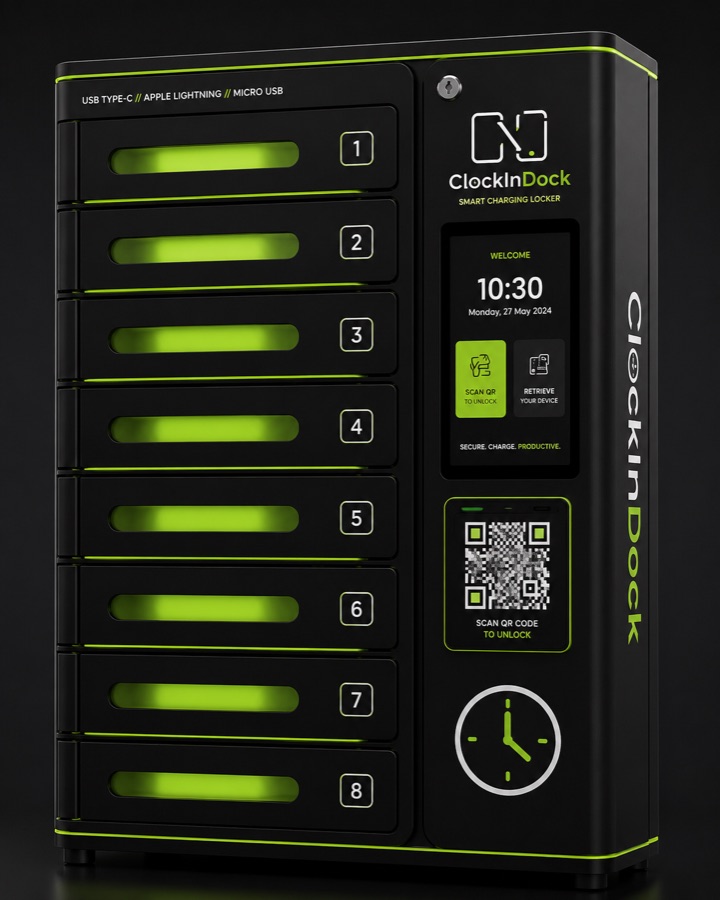
8-bay locker

The phone goes in the locker. Attendance on record, floor phone-free.

£99
per month, per venue · £12.38 a bay
  • 8-bay charging locker included
  • Everything in NFC
  • Phones off the floor during service
  • We fit it and we maintain it
See the 8-bay in your venue
Bigger teams
16-bay locker

For a full floor on at once — best value per bay.

£149
per month, per venue · £9.31 a bay
  • 16-bay charging locker included
  • Everything in NFC
  • Best rate per bay
  • We fit it and we maintain it
Book a demo
Cancel any time. No contract.

No minimum term, no notice period, no tie-in. The locker stays ours — if you stop, we come and collect it, so there is no kit to buy and nothing stranded on your books. Running several sites? Group pricing gets better per venue; tell us how many and we will price it on the call.

What is phone time actually costing you?

Your numbers, not ours. Drag these to match your venue and see what you are already paying for time nobody worked.

12
£12.71
4
8 hrs
3 min
Paid hours spent on phones, per month83 hrs
Money lost to staff phone time, per month
£1,057
That's about 10× the subscription — every month.

We are not going to pretend every one of those minutes comes back, and no software makes people perfect. But when the phone is in the locker rather than the apron pocket, the temptation is not there — and you only need a fraction of that number to cover the cost several times over.

In every plan

  • Rota builder with auto-fill and clash checks
  • Live rotas on every staff phone
  • Attendance, breaks and timesheets
  • Holiday requests and shift swaps
  • Multi-site owner view and per-venue managers
  • Payroll export and a full audit trail
  • Privacy notice and DPIA for your files
  • Unlimited staff — you are never charged per head

Staff use the phones they already carry. Nothing for them to buy, and nothing for you to install beyond the locker we bring.

The questions managers actually ask.

What happens when someone’s phone is dead or left at home?

They still work the shift. A manager records the hours by hand, or the member of staff requests a manual clock-in — every one is flagged for approval, and every edit to anyone’s hours is logged with who made it.

What about the cellar, where there’s no signal?

The whole shift records on the handset and uploads the moment it’s back online, as a request for a manager to approve. Nothing is lost to a dead spot.

Can one member of staff clock in for another?

Buddy punching is the thing the locker is there to stop. An account lives on one phone at a time — sign in somewhere else and the old handset is signed out — so a clock-in means that person’s own phone, on the dock, at the venue. It is a strong signal rather than a cast-iron proof, and we would rather say so: anything that looks wrong is raised for a manager to review, never quietly changed.

Do we have to buy the locker?

No. The locker is included in the monthly price and it stays ours — we fit it, we maintain it, and if you stop we come and collect it. There is no kit to buy and nothing stranded on your books.

Will it work with our payroll?

There is nothing to integrate. Hours come out as a CSV — one venue or the whole group at once — with the audit trail behind every figure, so whoever runs your payroll gets the week in the shape they already work in.

How long does it take to set up?

An afternoon. Staff use the phones they already carry, so there is nothing for them to buy and nothing for you to install beyond the locker we bring.

Will staff accept an app that knows where they are?

It never tracks them. Background location is never requested, so the phone won’t hand it over even by mistake. Location is read at clock-in and while a shift is running, clock-in coordinates are deleted after 90 days — and the whole policy is written in plain English. See exactly what the app reads →

See it running in your venue.

Tell us a little about your sites and we'll set the walkthrough up with your rota, your rates and your break rules — so you're looking at your own venue, not a demo account.

  • 1
    A 20-minute walkthroughYour rota on screen, not a canned tour. Bring your worst week.
  • 2
    A locker set up for youWe'll size the dock and chips to your venue and your headcount.
  • 3
    Live in an afternoonStaff use the phones they already carry. No new hardware for them.
The ClockIn Dock 8-bay smart charging locker
Please add your first name
Please add your last name
Please add your company or venue
Please add a valid email
Please add a phone number
Please choose
Please choose

We'll only use these details to arrange your demo. No newsletter, no list, no sharing. What we store, and for how long.

Got it — we'll be in touch

Your request is with us and we'll come back to you the same working day.